
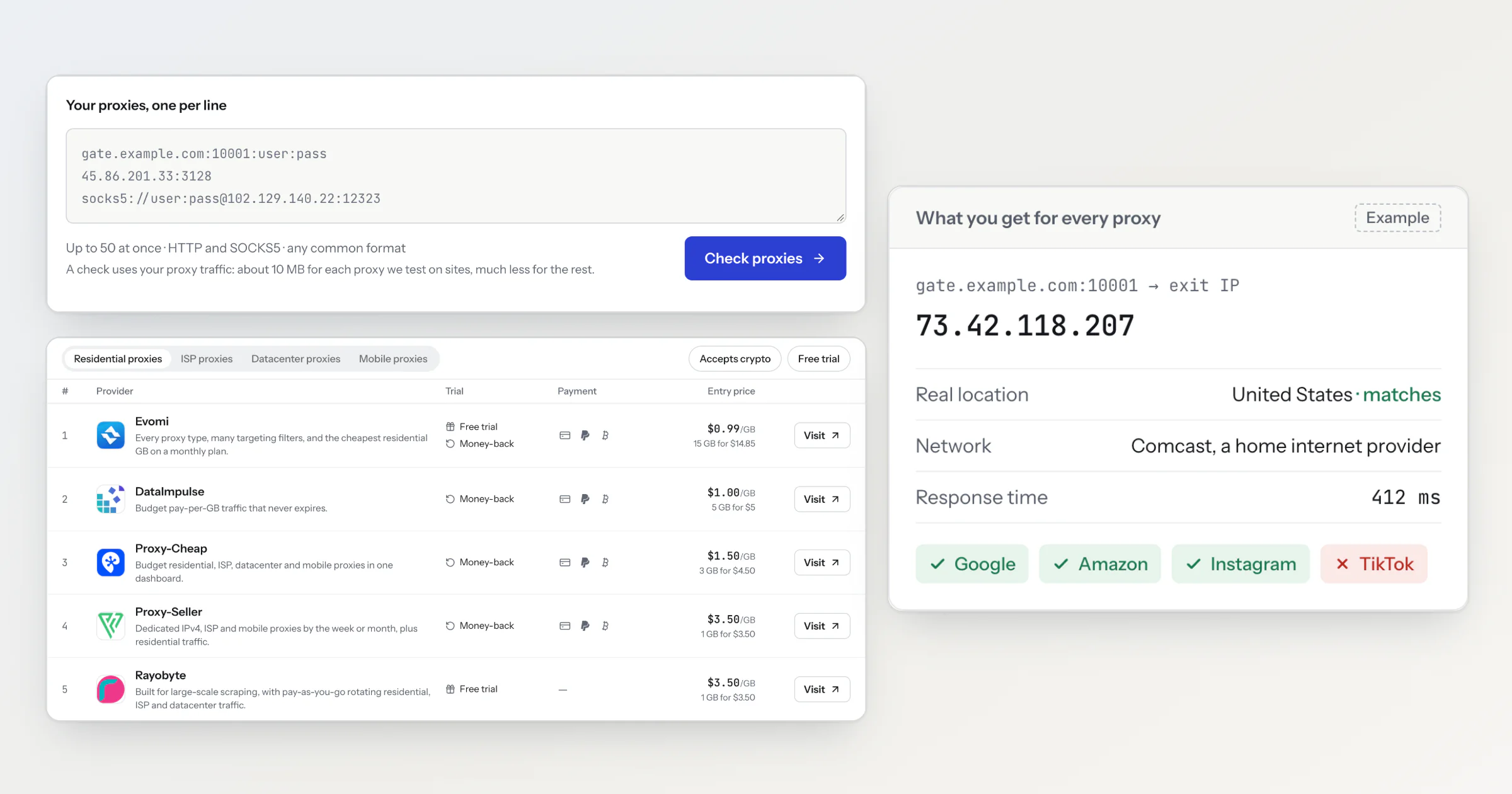
ProxyXray is a free site with two parts: a checker for the proxies you already have, and a table of providers you could buy from. Paste up to 50 proxies, with no sign-up. In about 30 seconds the report shows each one's real exit IP, the network that owns it and how fast it answers. The first 5 that work also load Google, Amazon, Instagram and TikTok.
I'm Denis Povarov, and I build ProxyXray alone.
You pay first and find out later
Say you buy a residential plan to watch prices on Amazon. The provider's page says the IPs are residential and names your country. Without a free trial, you can't test either claim until you have a login, and by then you've paid. The first sign of trouble can be a captcha in your script's logs.
Reviews won't warn you first. Provider blogs publish comparisons with their own name on top, and some rating sites order providers by sponsorship. So I built the checker to test the proxy itself, with the login from a plan you just bought or from a free trial.
What the report says about each proxy
For that Amazon plan, the report shows whether the exit is in your country, whether the network is a home provider or a host, and whether the product page loaded or showed a captcha.
In the report | What it tells you |
|---|---|
Exit IP | The address one request left from. A gateway's exit usually differs from the host you entered, and on a rotating login the next request can leave from another address. |
Location | The country and city of that IP. If the host is a gateway of a provider in the table and your login names a country, the report says whether that country matches the exit. |
Network (ASN) | The network that owns the IP. A home internet provider usually means a residential IP. |
IP type | Whether the IP is on X4BNet's datacenter list. The list misses small hosting providers, so an IP that isn't on it isn't proven to be a home IP. |
Blacklists | Whether the IP is on DroneBL, SpamCop, blocklist.de or PSBL, four public spam and abuse lists. |
Speed | How long a request through the proxy took, measured from one location in Germany. |
Anonymity | Whether the proxy adds headers that show a site you use a proxy, or your real IP. Only plain-HTTP sites see them: over HTTPS the proxy can't add headers. |
Why the site test runs in a real browser
On 23 October I loaded Google, Amazon, Instagram and TikTok from my home connection, with no proxy. curl, a command-line HTTP client, got blocked on all four even while it claimed to be Chrome: Google returned an "enable JavaScript" page, Amazon its captcha page, TikTok a JavaScript challenge, and Instagram an empty page shell. Chromium loaded all four normally.
A site test built on a plain HTTP client would fail every proxy on these sites and measure the client instead. So ProxyXray opens each page in Chromium and looks for blocks, captchas and login walls.
A browser loads real pages, so a proxy with a site test uses up to about 10 MB of your plan's traffic. Only the first 5 working proxies in your list get one, so a check uses up to about 50 MB. If the checker restarts in the middle of a check, the check runs once more and uses that traffic again.
The score from 0 to 100
A proxy gets a score when at least one site result says something about it: a pass, a captcha, a block or a timeout. Sites passed gives 40 points, and Not on blacklists, Honest and Speed give 20 each. From 70 the score reads Good, from 40 Mixed, and below that Risky. A proxy that passes fewer than half of the sites reads Mixed at best, whatever its score.
Honest covers the right country, no proxy headers and no datacenter IP sold as a home one. A part the check can't measure is left out, and the rest count for 100. So a proxy from a provider outside the table gets only the header check under Honest, and a SOCKS5 proxy can't add headers, so it always passes that check. How the score works in the report shows each part's points.
What one check can't tell you
A check is a snapshot. IPs change, so run it again before you buy or renew. Nothing re-checks a proxy later.
Rotation isn't tested. On a rotating login, the rows in the table above describe the IP of one request, and each site test can leave from another IP that the report doesn't show. One login can't speak for a provider's whole pool either.
Each site gets one page load: one Google search, one Amazon product page, one Instagram profile and one TikTok profile. A pass says that load worked, not that your script will get through at its request rate.
Speed comes from one location, so a far-away exit loses points for distance alone.
The checker starts no new site test after 60 seconds, so a check can run up to about 80 seconds. A proxy it skipped needs a check of its own.
What happens to your login
You're pasting a password into someone else's site, so you should know where it goes. Your browser tab keeps the pasted list until you close the tab, for Edit proxies and Check again. The list reaches the server through Cloudflare over HTTPS. The server encrypts each login and keeps it in Redis, a short-term store separate from the database, until the check ends, then deletes it. If the checker is busy or down, it waits 24 hours at most. The checker holds the login in memory for that one check. Usernames and passwords never reach the database or the logs.
Two things from a login stay: the country it names (country-us, for example), with the report, and for one hour a one-way hash of the host, port and username, which caps how often one login is tried.
A report stays for 30 days. It opens only in the browser or account that ran the check, and its share link hides the host, the port and the exit IP. For a proxy of a provider in the table, the site also keeps the result for provider statistics with no end date. That record holds the provider's gateway address and the country the login names, and no port, login, exit IP or account. The privacy policy has the full list.
The table, and how I earn from it
The table on the main page lists 13 providers (on 30 October 2026) with entry prices, free trials, payment methods and promo codes. It sorts by the lowest entry price until enough visitors have checked proxies, then by Most checked. Neither sort says which provider is best. A provider's page shows the date I last checked its prices.
Some Visit links are affiliate links: when you buy through one, the provider pays me a commission. A provider is listed whether or not it has an affiliate program, and a commission never changes which providers are listed or their order. Nobody can pay for a place in the table. The checker has no paid plan. The about page explains how Most checked counts visitors.